Every great story starts with an idea but transforming that idea into a compelling, structured narrative requires planning, clarity, and creativity. This is where a storyboard becomes one of the most valuable tools for writers, illustrators, filmmakers, educators, and content creators. It helps you visualize your story scene-by-scene before committing to full development, saving time and ensuring your narrative flows smoothly.
Whether you’re crafting a children’s picture book, animated short, comic, or video script, learning how to create a storyboard will help you bring your story ideas to life with confidence and clarity. In this guide, you’ll learn what a storyboard is, why it’s important, and how to create one step-by-step—all while making the storytelling process more exciting and creative.
What Is a Storyboard?
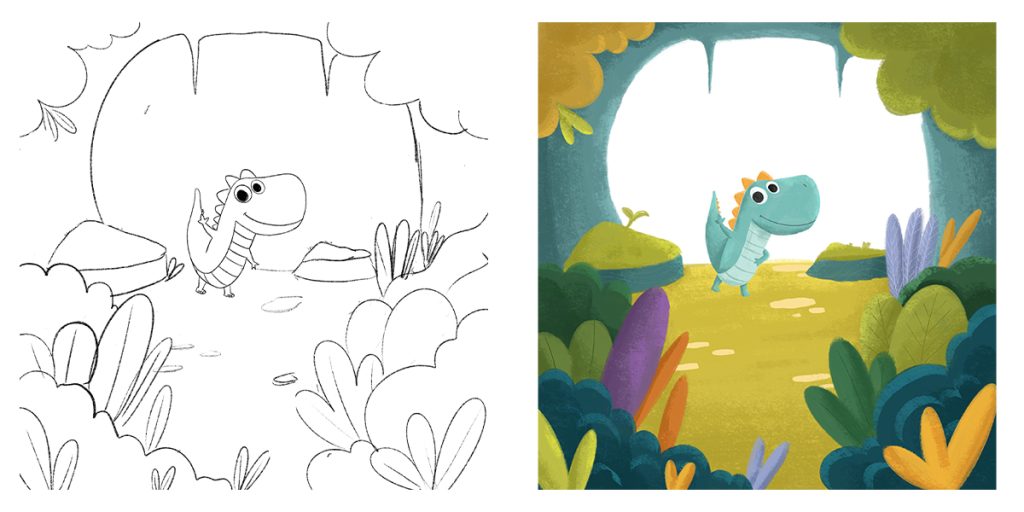
A storyboard is a visual outline that maps out key scenes of a story in sequence using sketches, brief text, and directional notes. Think of it as a blueprint of your story, helping you see how events unfold, how characters move, and how visuals and words work together.
Storyboards are widely used in:
- Children’s book writing
- Film and animation
- Comics and graphic novels
- YouTube and short-form video planning
- Game and app storytelling
- Educational storytelling and presentations
It doesn’t need to be perfect artwork simple drawings, stick figures, or visual cues are enough. The goal is to plan the storytelling experience before execution.
Why Storyboarding Helps Bring Ideas to Life
Storyboarding services doesn’t just organize your thoughts—it enhances your storytelling in multiple ways.
Transforms Abstract Ideas Into Concrete Structure
A story often begins as scattered thoughts or images. A storyboard helps pull those pieces together into a clear beginning, middle, and end.
Boosts Creativity During Planning
Seeing scenes visually sparks new ideas. You may discover better transitions, emotional moments, or fun twists while sketching your frames.
Improves Visual and Emotional Flow
A storyboard lets you control pacing, mood, and engagement. You can check if scenes are too slow, too rushed, or lack emotional impact.
Saves Time and Reduces Rework
It’s easier to adjust rough sketches than redo full drafts or illustrations later. Storyboards prevent confusion or inconsistent storytelling.
A Must-Have for Collaboration
If you’re working with illustrators, animators, designers, or editors, a storyboard creates a shared vision so everyone stays aligned.
Also Read:Why Work with The Rainbow Stories for Character Development?
Step-by-Step: How to Create a Storyboard That Brings Ideas Alive
You don’t need advanced drawing skills—just the willingness to explore your idea visually. Here’s a simple process you can follow.
1. Clarify Your Story Concept and Goal
Start by defining what the story is about and what you want the audience to feel or learn.
Ask yourself:
- What is the core message or theme?
- Who is the target audience?
- What emotion should the story leave behind?
For example:
A story about two friends who discover the power of teamwork.
This clarity will guide your scenes and tone.
2. Write a Short Summary of Your Story
Before drawing anything, create a brief summary of your story in 5–6 sentences. This acts as your baseline.
Example summary:
Lily and Max find a mysterious map. They argue about how to follow it but soon realize teamwork helps them solve puzzles. They reach the treasure and learn that sharing success is better than winning alone.
This summary makes sure your storyboard stays focused.
3. Break the Story Into Key Scenes
Identify the major plot points. Most stories follow a simple structure:
| Stage | What Happens |
|---|---|
| Setup | Introduce characters and the setting |
| Conflict | A problem or challenge appears |
| Rising Action | Attempts, tensions, or the main journey |
| Climax | The big moment or turning point |
| Resolution | Conflict is resolved and a lesson is learned |
Aim for 10–14 key scenes to keep the flow smooth and engaging.
4. Decide the Format of Your Storyboard
Your storyboard can be:
- Page-based (for books)
- Scene-based (for videos/films)
- Panel-based (for comics)
- Shot-based (for animation)
Choose the format that matches your project.
For beginners, a 6 or 12-frame storyboard sheet works well.
5. Start Sketching Your Frames
Draw rectangles across a page each one is a scene or page. Inside each frame:
- Sketch the main action
- Add short text or dialogue
- Include key emotions or movements
Keep drawings simple. The purpose is clarity, not perfection.
Example for a frame:
Lily and Max find a treasure map in a dusty attic. Lily wants to explore immediately. Max hesitates.
This helps you visualize the moment.
6. Add Notes for Sound, Motion, and Transitions (Optional)
For video or animation storyboards, include extra details:
- Camera angles (Close-up / Wide shot)
- Movement arrows
- Sound cues
- Emotion indicators
- Background details
These notes make your storyboard more expressive and easier for production.
7. Review Flow, Pacing, and Engagement
Read your storyboard from start to finish.
Check if:
- Scenes transition smoothly
- Emotion builds toward the climax
- Story keeps the audience’s attention
- Each scene adds value
If a scene feels slow, unclear, or irrelevant, adjust or remove it.
8. Share for Feedback and Refine
Show your storyboard to someone who matches your target audience—or a peer with storytelling experience. Ask:
- Was anything confusing?
- Was the pacing interesting?
- Did the ending feel satisfying?
Use feedback to polish your storyboard before writing or illustrating the final version.
Also Read:Custom Character Development That Matches Your Story Voice
Different Types of Storyboards You Can Use
Depending on your project, choose the storyboard style that suits you best.
1. Thumbnail Storyboards
Quick tiny sketches to capture rough flow. Great for brainstorming.
2. Detailed Storyboards
Larger frames with expressions, background details, and text. Ideal for books and animations.
3. Digital Storyboards
Made on tools like Canva, StoryboardThat, or Procreate. Easy to edit, share, and reuse.
4. Photo Storyboards
Use real images instead of sketches amazing for video and advertising planning.
Helpful Tips to Bring Your Storyboard to Life
Here’s how to elevate your storyboard into a powerful storytelling tool:
- Focus on Emotion – show how characters feel, not just what they do.
- Use Visual Arrows and Symbols – show movement and actions clearly.
- Think Like Your Audience – keep visuals relatable for your age group.
- Leave Room for Page-Turn Hooks – end frames with curiosity or suspense.
- Keep Consistency in Characters – expressions, clothing, and behaviors must stay aligned across scenes.
A storyboard should make your story unfold like a movie in the audience’s mind.
Common Mistakes to Avoid
Avoid these pitfalls to keep your storyboard effective and engaging:
- Overcrowding frames with too many ideas
- Forgetting transitions between scenes
- Skipping emotional development
- Adding visuals that don’t support the message
- Writing too much text—keep it visual
A clean, simple storyboard is more powerful than a cluttered one.
Conclusion
A storyboard is more than a planning tool. At The Rainbow Stories, we see it as a creative guide that brings story ideas to life with clarity, emotion, and flow. Whether you are building a children’s book, animation, comic, or video, a storyboard helps shape a structured, engaging, and visually rich experience for young readers and families.
Start simple, experiment freely, and refine your storyboard as your ideas grow. At The Rainbow Stories, storyboarding is a key part of how we turn imagination into meaningful stories, and with practice, it becomes one of your strongest storytelling skills.
Frequently Ask Questions
Do I need to be good at drawing to make a storyboard?
No, drawing skill is not required. Use stick figures, shapes, or symbols—the goal is clarity, not art.
How many frames should a beginner storyboard include?
Start with 6, then expand to 12 or more once you’re comfortable.
Should I storyboard before writing or after?
Ideally, storyboard after brainstorming your concept. It helps you shape the story visually before writing.
Can storyboards be used for short-form content like reels or TikTok videos?
Absolutely! Storyboarding helps structure sequences, hooks, and transitions for better audience engagement.